
Principles of Interaction Design
Questions to Consider when Designing for Interaction
| Define How Users Can Interact with the Interface |
|
| Give Users Clues about Behavior before Actions are Taken |
|
| Anticipate and Mitigate Errors |
|
| Consider System Feedback and Response Time |
|
| Strategically Think about Each Elements |
|
| Simplify for Learnability |
|
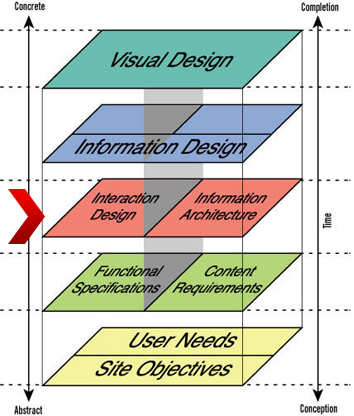 Elements of User Experience. Jesse James Garrett. Source: http://www.jjg.net/elements/
1. Consistency
We are wired to be sensitive to change. Changes to a layout attract our attention. As long as persistent elements remain in the same place, retain the same appearance, and adhere to the same grid layout and proportions, we do not direct attention toward them until we need them. But when elements move and change appearance without purpose across pages or screens, it becomes immediately noticeable.If people are asking why something is the way it is, or why it is different, then they've been distracted by the interface. When designs are consistent in appearance and behavior, people are able to focus on their tasks, and they're not distracted by surprising or unexpected changes.
2. Perceivability
Perceivability invites interaction. Hidden interactions decrease usability and efficiency. People should not need to search for opportunities to interact. They should not guess when interacting, due to confusion or desperation. We should be able to review an interface, and identify where we can interact. Interaction should not depend on luck or random discovery.3. Learnability
Interactions should be easy to learn, and easy to remember. Ideally, people should be able use an interface once, learn it, and remember it forever. Practically, people often need to use an interface at least a few times before they learn it, and then we hope that they will remember what they have learned.4. Predictability
Good interaction design should set accurate expectations about what will happen before the interaction has occurred. We should be able to show people an interface and ask, before they interact, what can you do here? Where can you interact with this? What will happen if you do that? What will be the result, or outcome?We can set context and expectations by either demonstrating what can be done, such as animations, video, or overlays, or by describing what can be done, such as providing examples or instructions.
5. Feedback
Feedback provides acknowledgment of our interactions and information about their outcomes. We use feedback to understand where we are, our current condition or status, what we can do next, and even to know when we are finished.Feedback should complement the experience, not complicate it. Provide feedback when people need it. It should be noticeable and meaningful. Failure to acknowledge an interaction, or provide feedback that is not noticed, can lead to unnecessary repetition of actions, mistakes, and errors.
Forming a System
The five principles all work together in a system. When interactions are perceivable and noticeable, and their outcomes can be accurately predicted, people will interact with the interface. When meaningful feedback is provided after an interaction, people will understand how their actions led to the outcomes. When people understand the feedback from their interactions, and they learn how the interface works, with continued practice and observation of the interface, their learning becomes stronger.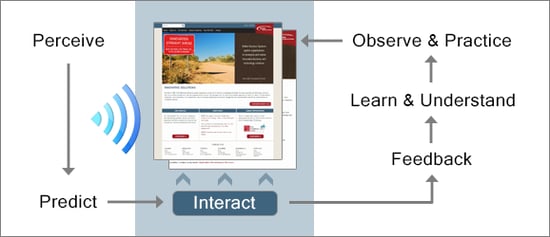
Usability
Usability may feel like a vague term, but at its heart, designers are simply asking “can someone easily use this?” It’s been explained in books and online in a myriad of ways, and we will review a few different definitions to uncover some common themes and nuances:In the book Human Computer Interaction by authors Alan Dix, Janet E. Finlay, Gregory D. Abowd, Russell Beale, usability is broken down into three principles:
- Learnability: how easily can a new user learn to navigate the interface?
- Flexibility: how many ways can a user interact with the system?
- Robustness: how well are we supporting users when they face errors?
- Learnability: how easily can a new user learn to navigate the interface?
- Efficiency: how quickly can users perform tasks?
- Memorability: if a user hasn’t visited the system in a while, how well will they remember the interface?
- Errors: how many errors do users make, and how quickly can they recover from errors?
- Satisfaction: do users enjoy using the interface, and are they pleased with the results?
- Learnability: how easily can a new user learn to navigate the interface?
- Understandability: how well can a user understand what they are seeing?
- Operability: how much control does the user have within the interface?
- Attractiveness: how visually appealing is the interface?
- Usability compliance: does the interface adhere to standards?
